Claude Code Agent Teams: What Breaks When Teammates Collide
Set up Claude Code agent teams, keep teammates from overwriting each other's files with an ownership hook, and see where a team's coordination stops.
Claude Code agent teams let one Claude Code session spin up several teammates that share a task list and message each other directly. They're useful, and they're experimental. The part every tutorial skips is what happens when two teammates edit the same file, and where the team's coordination stops. My co-founder Nick and I run between 2 and 15 agents at a time on one repo, across Anthropic, OpenAI and Gemini models. This guide covers how to set agent teams up, how to stop teammates overwriting each other, and the boundary you'll hit once more than one person is involved.
What are Claude Code agent teams?
An agent team is a group of Claude Code instances working on one task. The session you start becomes the team lead: it spawns teammates, creates tasks and combines their results. Each teammate runs in its own context window, claims work from a shared task list, and messages other teammates, or you, directly.
That's different from a single session with helpers. Teammates don't inherit the lead's conversation. They load the same project context as a fresh session (CLAUDE.md, MCP servers, skills) plus the spawn prompt the lead gives them. So what you write in that prompt is most of what a teammate knows about its job.
How to enable agent teams in Claude Code
Agent teams are off by default. To turn them on:
- Set the environment variable in your shell, or in
settings.json:
{
  "env": {
    "CLAUDE_CODE_EXPERIMENTAL_AGENT_TEAMS": "1"
  }
}
- Start an interactive session. Teams don't form in non-interactive
-pruns or Agent SDK sessions, even with the variable set. - Pick a display mode. The default, in-process, runs every teammate inside your terminal and works anywhere: use the arrow keys in the agent panel to pick a teammate and Enter to open it. Split panes give each teammate its own pane and need tmux or iTerm2. They don't work in VS Code's integrated terminal, Windows Terminal or Ghostty. I run split panes because I want to see every teammate's output at once.
- Ask for a team in plain language, naming the roles:
Spawn three teammates to review this pull request: one for security,
one for performance, one for test coverage. Have each report findings.
One side effect to know about: once teams are enabled, a subagent that Claude decides to name launches as a teammate. So a team can form even when you only expected a quick helper.
Agent teams vs subagents
| Subagents | Agent teams | |
|---|---|---|
| Where they run | Inside your session | Separate Claude Code instances |
| How they report | Return a result to the main agent | Message each other and the lead directly |
| Coordination | The main agent manages everything | Shared task list plus messaging |
| Token cost | Lower | Higher: each teammate is a full session |
| Best for | Focused jobs where only the answer matters | Work that needs discussion, review or parallel exploration |
If the work is "go find X and tell me", use a subagent. If teammates need to challenge each other's findings or split a feature, a team earns its extra tokens.
What happens when two teammates edit the same file?
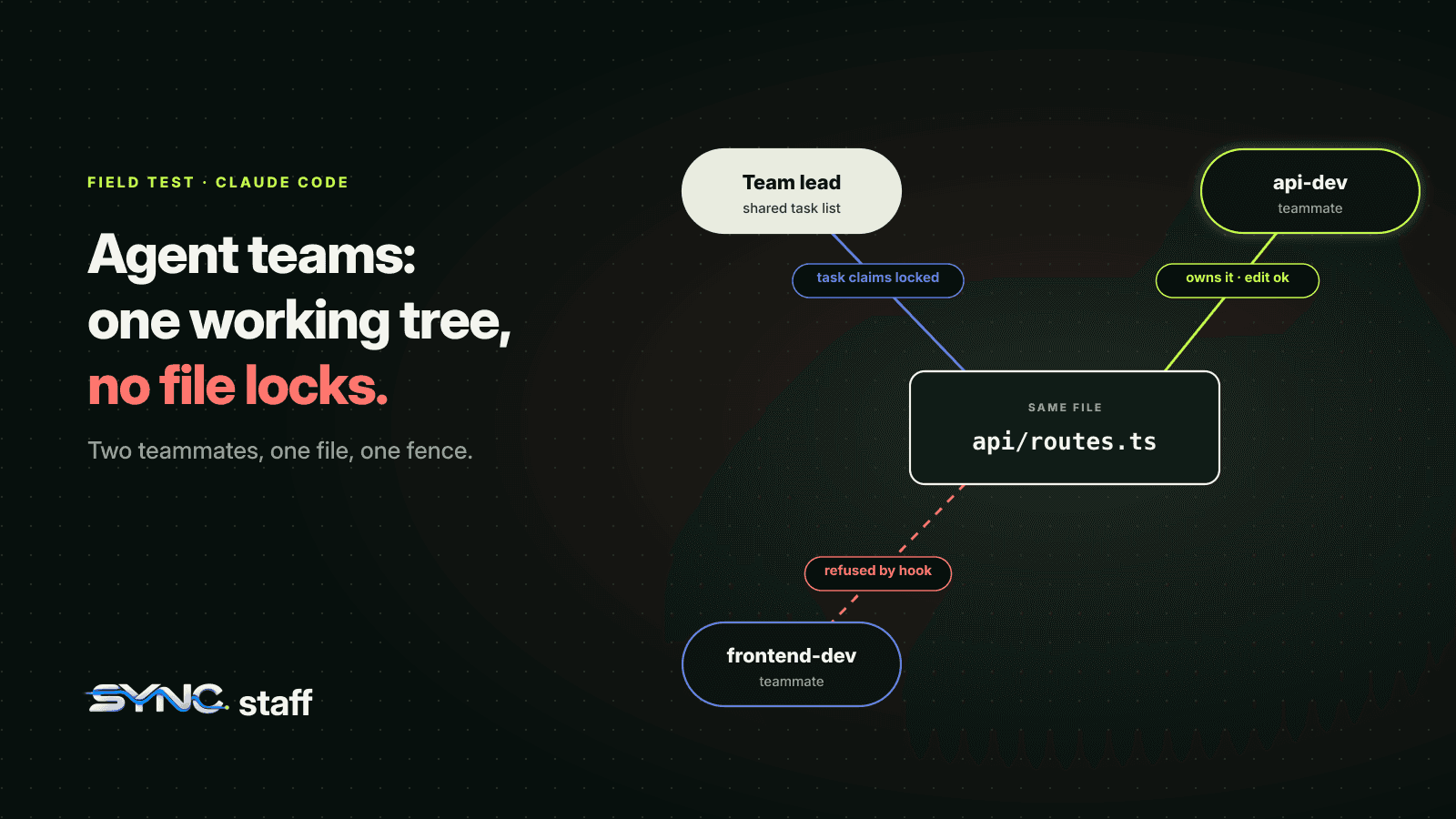
Teammates edit the same working tree, and nothing locks a file while one of them works on it. Claude Code's docs are explicit: "Two teammates editing the same file leads to overwrites." The task list is protected by file locking, so two teammates can't claim the same task, but the files themselves are open to everyone.
In practice a collision goes one of two ways. If the second edit still matches the text it expected, it lands, even on top of the first teammate's work. If it doesn't match, Claude Code's Edit tool refuses it, and that teammate's task quietly never happens. We saw the second case when we ran two subagents on the same line, written up in Claude Code subagents vs agent teams. Either way, someone's work is lost.
This is the problem that made us build SyncStaff. Before it, Nick and I were building a predictive model for risk-adjusted wagers across betting markets, with several agents each. We had overwrites and collisions constantly. We'd agree "you work on this, I'll work on that", and it held until the current bug was fixed and we moved on to other work. Then the boundaries blurred and we broke things: the models, the databases, the UI. We spent more time troubleshooting changes we hadn't been watching than building.
An agent team has the same failure mode, only faster: no agent stops to check what the other one just changed.
How to keep teammates out of each other's files
The docs' advice is to split work so each teammate owns a different set of files. That's right, but on its own it's a request, not a rule. Here are three ways to make it hold.
Assign ownership in the spawn prompt
Name the directories, not just the roles:
Spawn two teammates. "web" owns everything under web/ and may not edit
anything else. "api" owns api/ and db/migrations/. If either needs a change
outside its directories, it messages the lead instead of making it.
A prompt is still only a request. When a teammate decides an out-of-scope edit is the quickest fix, nothing stops it, and you find out later. The same goes for CLAUDE.md, which Claude treats as context rather than enforcement; we cover what a team file should hold in CLAUDE.md best practices for teams.
Enforce ownership with a PreToolUse hook
Claude Code runs a PreToolUse hook before every tool call, and a hook can deny the call. For a teammate, the hook input's agent_type field holds the teammate's name. The docs only describe that field for subagents, so we tested it, on Claude Code 2.1.302. That means you can name teammates, map each name to the paths it owns, and block everything else.
Create .claude/ownership.json:
{
  "frontend-dev": ["web/"],
  "api-dev": ["api/", "db/migrations/"]
}
Save this as .claude/hooks/enforce-ownership.py:
#!/usr/bin/env python3
"""PreToolUse hook: block a teammate from editing files outside the paths it owns.

Ownership lives in .claude/ownership.json, keyed by teammate name, e.g.
{"frontend-dev": ["web/"], "api-dev": ["api/", "db/migrations/"]}. For a teammate, Claude Code
puts the name the lead gave it in `agent_type` (tested on v2.1.302), and the lead often adds a
numeric suffix ("api-dev-1"), so "api-dev-1" matches the "api-dev" entry.
Agents without an entry (the lead, unnamed helpers) are not restricted.
"""
import json, os, re, sys

event = json.load(sys.stdin)
agent = event.get("agent_type")
path = (event.get("tool_input") or {}).get("file_path")
if not agent or not path:
    sys.exit(0)  # not a teammate edit; normal permission flow

root = event.get("cwd") or os.getcwd()
try:
    with open(os.path.join(root, ".claude", "ownership.json")) as f:
        table = json.load(f)
except FileNotFoundError:
    sys.exit(0)
owned = table.get(agent, table.get(re.sub(r"-\d+$", "", agent)))
if owned is None:
    sys.exit(0)

rel = os.path.relpath(os.path.realpath(path), os.path.realpath(root)).replace(os.sep, "/")
if any(rel == p.rstrip("/") or rel.startswith(p.rstrip("/") + "/") for p in owned):
    sys.exit(0)

print(json.dumps({"hookSpecificOutput": {
    "hookEventName": "PreToolUse",
    "permissionDecision": "deny",
    "permissionDecisionReason": f"{agent} owns {', '.join(owned)}; {rel} belongs to another teammate. "
                                "Message the lead or the owner instead of editing it."}}))
Register it in .claude/settings.json:
{
  "hooks": {
    "PreToolUse": [
      {
        "matcher": "Edit|Write",
        "hooks": [
          { "type": "command", "command": "python3 \"$CLAUDE_PROJECT_DIR\"/.claude/hooks/enforce-ownership.py" }
        ]
      }
    ]
  }
}
Commit the hook and ownership.json alongside the rest of your team settings, so every session in the repository gets them. Then name the teammates when you spawn them: "Spawn a teammate named frontend-dev to...". The lead sometimes adds a suffix (frontend-dev-1), which the script ignores. The lead and any agent without an entry stay unrestricted. The script resolves ../ paths before checking, so web/../api/routes.ts is still caught. It also won't confuse api/ with a folder called apiextra/.
Know the limits. The hook only sees the Edit and Write tools, so a teammate that writes files through a shell command (sed -i, echo >) gets past it. It also relies on the names the lead assigns, so name every teammate in your prompt.
We ran exactly this setup with two teammates and told both to add a line to api/routes.ts. The api-dev teammate's edit went through. The frontend-dev teammate's was refused before it touched the file:
PreToolUse:Edit hook error: frontend-dev owns web/; api/routes.ts belongs to another teammate.
Message the lead or the owner instead of editing it.
Sequence same-file work instead of parallelising it
Some changes genuinely touch shared files: a router, a schema, a lockfile. Don't split those across teammates. Make them one task, or make the second task depend on the first so it can't be claimed until the first is done. The task list handles dependencies for you. Add a TaskCompleted hook that exits with code 2 when tests fail, and a teammate can't mark a task done while it's broken.
Where is the human in an agent team?
Mostly in the lead's session, and less in the loop than you might expect. Teammates inherit the lead's permissions, their plans are approved by the lead without your review, and every permission prompt lands in one place. Three details matter:
- Permissions are inherited. Teammates start with the lead's permission mode. If you start the lead with
--dangerously-skip-permissions, every teammate runs that way too, and you can't set per-teammate modes at spawn. - Plans are approved automatically. If the lead is in plan mode, a teammate plans first and then sends a plan approval request. The lead's session approves it as soon as it arrives, without reviewing it. Edits still go through normal permission prompts. We cover plan mode on its own in Claude Code plan mode.
- Prompts pile up on the lead. Every teammate's permission request appears in the lead's session, so a five-teammate team can bury you in prompts. The docs suggest pre-approving common operations, which helps, but it moves the decision from "per change" to "per kind of change".
None of this is wrong for a single developer running a quick review. It matters when the team is changing production code. In our setup, the rule is that any major change is flagged for human review and the agent doesn't proceed until one of us approves or rejects it. What counts as "major" is decided by a Chief of Staff agent we've trained on what matters to us. Agent teams don't have an equivalent built in. The TaskCreated and TaskCompleted hooks are the closest thing you can wire up yourself. We go deeper on modes and ask rules in Claude Code permissions for teams, and on what our escalation data shows in human in the loop for AI agents.
Where agent teams stop: one session, one person
This is the limit we hit hardest. An agent team lives inside one session:
- A session has exactly one team, and you can't share a team across sessions.
- Teammates can't spawn their own teammates, and the lead can't hand leadership to anyone else.
- In-process teammates don't come back after
/resume.
We tried agent teams with our real setup: about 10 agents, a mix of OpenAI, Gemini and Anthropic models, mine and Nick's. I watch mine in tmux split panes; Nick works in Codex. It didn't work well, for a structural reason: the team could only coordinate the teammates inside my session. Nick's agents, and every Codex or Gemini agent, were outside it. They edited the same repo, and the team had no idea they existed. That's not a bug in agent teams. They're designed for one person directing Claude instances. Codex has the same boundary: its worktrees isolate each session but don't coordinate them, as our Codex worktrees test showed.
Most engineering teams look like ours, not like the demo. Several people each run a few agents, and they switch models and tools depending on the job. That gap between more agents and more shipped work is the AI productivity paradox. Coordination then has to happen across sessions, people and vendors. That's the layer we built SyncStaff for: every agent declares what it's about to change, takes a lease on the files, and gets stopped and escalated to a human before it collides with someone else's work. We build SyncStaff with SyncStaff, with anywhere from 2 to 15 agents on the repo at once.
Here's what that looks like in our own records. Between August 3 and October 18, 2026, the two of us logged 544 agent-days on the SyncStaff repo, with 21 to 45 different agents active each week, and closed 623 work items. Forty times, an agent asked for files another agent was already changing and was refused before it touched them. Agents raised 568 decisions they weren't allowed to make alone: we answered 356 ourselves, and our Chief of Staff resolved 161. The load on us dropped once the Chief of Staff started resolving routine decisions at the end of August. In the week of August 24 we were fielding 3.6 escalations per agent-day; since late September it has stayed under 0.5.
How many teammates should you run?
Anthropic's guidance is to start with three to five teammates and about five or six tasks per teammate. Token use grows linearly with each teammate, coordination overhead grows with it, and three focused teammates often beat five scattered ones. Treat that as a starting point, not a rule.
On cost, the honest answer is that it depends on how hard the work is and which models you run. We use the monthly plans, and the API works too. A team costs roughly what that many separate sessions would, so run the lead on your strongest model and teammates on a cheaper one when the work is execution rather than judgement.
Known limitations to plan around
Agent teams are experimental, and the documented gaps matter for real work:
- No resume.
/resumeand/rewinddon't restore in-process teammates, and the lead may try to message teammates that no longer exist. - Task status can lag. A teammate sometimes forgets to mark a task complete, which blocks the tasks that depend on it.
- Shutdown is slow. Teammates finish their current request or tool call before they stop.
- The lead is fixed for the life of the session, and one team per session is the hard ceiling.
- The lead sometimes does the work itself instead of waiting. Tell it to wait for its teammates.
Start with a review, then give every teammate a fence
If you're trying agent teams for the first time, start with a task that doesn't write code: a parallel review of one pull request, or competing hypotheses on one bug. You'll see the value without risking an overwrite. When you move to parallel implementation, give each teammate a fence: an owner per directory, the ownership hook above, and dependencies for anything shared. And if your repo has more than one person on it, or agents from more than one vendor, the fence has to be bigger than a session can hold. Here's how we draw it across a whole team, with leases, conflict arbitration and a human sign-off for the changes that matter.
Sources: Claude Code agent teams documentation, Claude Code hooks reference.
Frequently asked questions
How do I enable agent teams in Claude Code?
Set the environment variable CLAUDE_CODE_EXPERIMENTAL_AGENT_TEAMS to 1, either in your shell or in the env block of settings.json, then start an interactive Claude Code session and ask for teammates in plain language. Teams don't form in non-interactive -p sessions or Agent SDK sessions, even with the variable set.
What is the difference between agent teams and subagents?
Subagents run inside one session and report a result back to the main agent. Agent teams are separate Claude Code instances with their own context windows that share a task list and message each other directly. Teams suit work that needs discussion; subagents suit focused tasks where only the result matters, at lower token cost.
Can two teammates edit the same file?
They can, and that is the problem: teammates share one working tree, so two teammates editing the same file overwrite each other. Claude Code locks task claiming, not file edits. Give each teammate its own files, sequence same-file work through task dependencies, or block out-of-scope edits with a PreToolUse hook.
How many teammates should an agent team have?
Anthropic's documentation recommends starting with three to five teammates and about five to six tasks per teammate. Token use grows linearly with each teammate, and coordination overhead rises with team size, so three focused teammates often outperform five scattered ones. Add teammates only when the work is genuinely independent.
Do agent teams work in the VS Code terminal?
Yes, in the default in-process mode, which runs every teammate inside your main terminal and works anywhere. Split-pane mode, which gives each teammate its own pane, needs tmux or iTerm2 and isn't supported in VS Code's integrated terminal, Windows Terminal, or Ghostty.