Claude Code Permissions for Teams: Modes, Rules, Limits
The six Claude Code permission modes, what auto mode's classifier catches and misses, and how to set permissions so the right decisions reach a person.
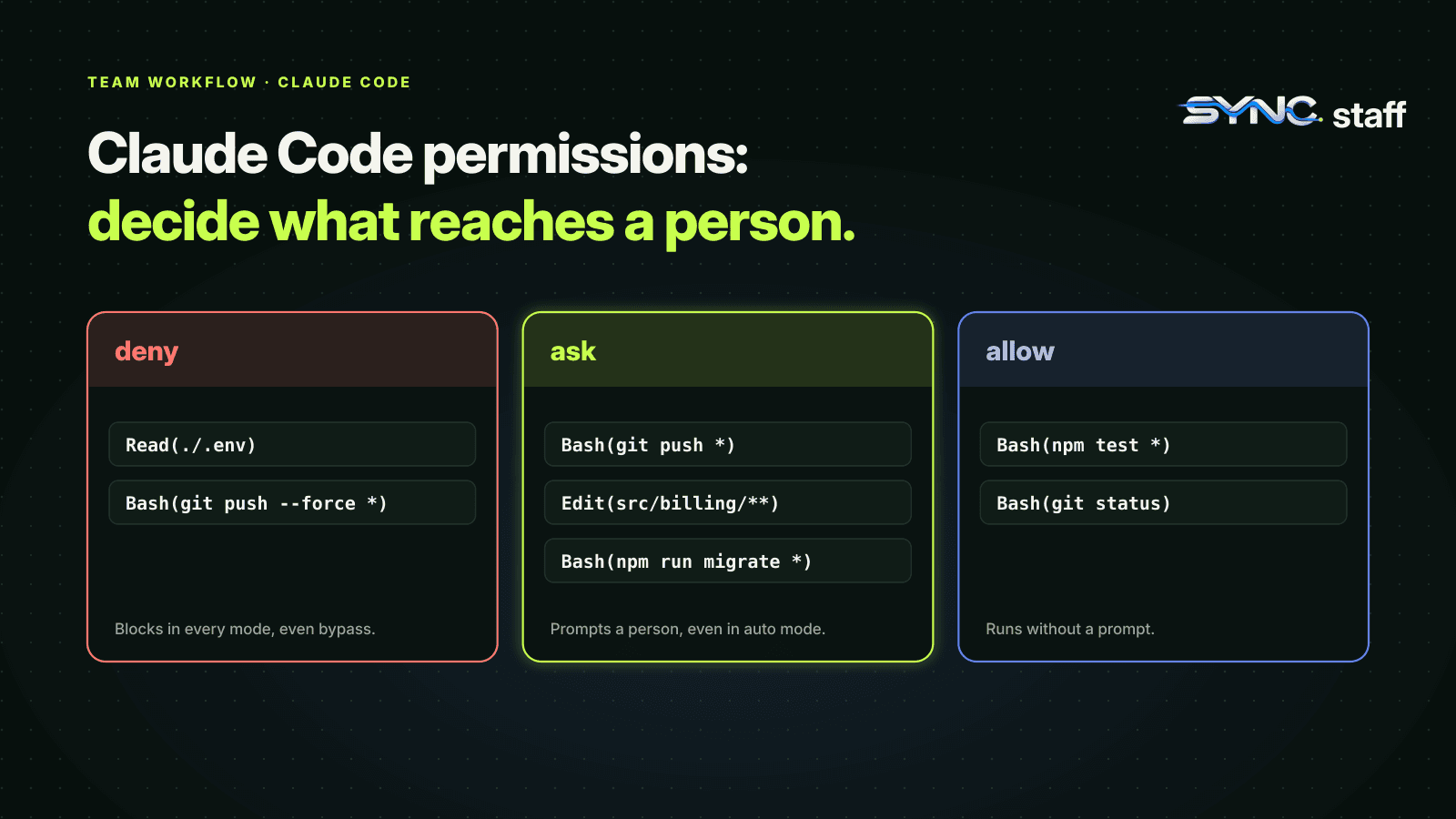
Claude Code permissions decide what an agent can do without asking you first. With one agent, they're a dial between speed and caution. With a team running many agents, they're the difference between an agent that pauses before something risky and one that does it while nobody is watching. This guide covers the six permission modes, the auto mode most sessions now start in, what its safety classifier does and doesn't catch, and how to set permissions for a team so the right decisions still reach a person.
How Claude Code permissions work
Every tool call goes through two layers. The permission mode sets the baseline: which actions run without a prompt. Permission rules in your settings files sit on top, allowing, asking about or denying specific tools and commands. Rules are evaluated deny first, then ask, then allow, and a deny blocks the action in every mode, including the one that skips all other checks.
The rules are enforced by Claude Code, not by the model. An instruction in CLAUDE.md shapes what Claude tries to do; a permission rule decides what Claude Code lets it do. For anything that must hold, use a rule. We cover the rule syntax and where each rule belongs in Claude Code settings for teams.
The six permission modes
| Mode | What runs without asking | Best for |
|---|---|---|
default (Manual) |
Reads only | Sensitive work, reviewing every action |
acceptEdits |
Reads, file edits, common filesystem commands | Iterating on code you're watching |
plan |
Reads, plus classifier-approved commands where auto mode is available | Exploring before changing anything |
auto |
Everything, with a background safety check | Long tasks, less prompt fatigue |
dontAsk |
Reads in the working directory and pre-approved tools; anything else is denied | CI and scripts |
bypassPermissions |
Everything | Isolated containers and VMs only |
Switch modes with Shift+Tab in the CLI. Set the mode sessions start in with defaultMode in your settings; auto only takes effect from user settings, not project files. The CLI calls the cautious mode Manual; its config value is default.
Auto mode is probably your default already
Since Claude Code v2.1.283, auto mode is the built-in starting mode for interactive terminal and VS Code sessions. If your team hasn't set a defaultMode, most of your agents are running in it.
In auto mode, a second model, the classifier, reviews actions like shell commands and network requests instead of asking you. It trusts your working directory and the Git remotes configured when the session started, and treats everything else as external. By default it blocks a long list of actions, including:
- downloading and running code, like
curl | bash - sending sensitive data to external endpoints
- production deploys and migrations
- force pushes
git reset --hard,git checkout -- .,git clean -fdand other commands that would discard uncommitted changes- merging a pull request no human has approved, or approving Claude's own
- changing IAM permissions, secrets, DNS or shared infrastructure
When it blocks something, Claude Code tells you and lists the action under Recently denied in /permissions, where you can retry it with a manual approval. If the classifier blocks three actions in a row, or 20 in a session, auto mode pauses and Claude Code goes back to prompting.
That's a well-designed safety net. It matters on a shared repository, too: blocking git reset --hard and git clean -fd protects uncommitted work that might not be this agent's.
What auto mode doesn't know
Here's the gap for teams. The classifier judges each action on its own: is this command destructive, does it send data out, does it touch production? It doesn't know what other agents are doing. An edit inside the working directory is ordinary work, so it's approved, even if another agent is halfway through changing the same file, and even if a teammate's Codex session owns that part of the codebase this week.
That isn't a flaw in auto mode. It's outside what a permission system can see. Permissions answer "may this agent do this kind of thing?" Coordination answers "should this agent change this file right now, given everyone else?" A team with several agents needs both.
Protected paths: the writes no mode waves through
Some files are never auto-approved, whatever the mode, because a bad write to them corrupts the repository or Claude's own setup. Claude Code calls these protected paths, and they include your Git metadata and Claude Code's configuration. How each mode treats a write to one:
| Mode | Write to a protected path |
|---|---|
Manual, acceptEdits |
Prompts you |
auto |
Goes to the classifier |
dontAsk |
Denied |
bypassPermissions |
Allowed |
An allow rule can't change this: the safety check runs before allow rules are read, so an Edit(.claude/**) allow entry doesn't pre-approve edits there. That's deliberate, and it matters for teams, because .claude/ holds the shared settings and hooks every agent relies on. An agent that could quietly edit them could switch off the checks the rest of the team depends on.
Removals aimed at critical paths, such as the filesystem root, your home directory or your working directory, are stricter still. No allow rule or hook can approve them: depending on the mode they either ask you or are denied, and even bypassPermissions asks.
What --dangerously-skip-permissions actually does
--dangerously-skip-permissions starts a session in bypassPermissions mode: no prompts and no safety checks, including writes to protected paths like your Git metadata and Claude's own configuration. Anthropic's guidance is to use it only in isolated containers and VMs.
A few things still hold even in this mode. Deny rules still block. Explicit ask rules still prompt. Removals targeting critical paths still prompt. But the classifier isn't running, so nothing reviews a force push or a production deploy before it happens.
For teams, it also spreads. In Claude Code agent teams, every teammate starts with the lead's permission mode, so one lead started with the flag means every teammate runs without checks too. We covered that and the rest of the agent-team permission model in what breaks when Claude Code agent teams collide.
If nobody on your team should use it, say so in settings rather than in a wiki: permissions.disableBypassPermissionsMode, set in managed settings, can't be overridden by anyone. A developer can also set it in their own user settings to lock themselves out of the mode.
How to set Claude Code permissions for a team
- Choose the starting mode on purpose. Manual and
plancan be set for everyone withdefaultModein the shared.claude/settings.json. Auto is the built-in default, butdefaultMode: "auto"only takes effect from each developer's~/.claude/settings.json, not from project files. Auto suits teams whose deny and ask rules cover what must never happen silently; Manual suits sensitive codebases. - Deny what no agent should ever touch. Secrets, credential files, destructive commands. Deny rules hold in every mode and across every settings file.
- Add ask rules for decisions a person should make. A push, a migration, a change to billing code. Ask rules prompt even in auto mode, which makes them the simplest human checkpoint there is.
- Allow the routine. Test, lint and read-only Git commands. Fewer pointless prompts means people actually read the ones that matter.
- Disable bypass mode centrally if your agents run on developer machines rather than throwaway containers.
- Review denials. Repeated blocks in auto mode usually mean the classifier is missing context about your infrastructure. An administrator can configure trusted infrastructure so legitimate work stops being blocked.
Where the human belongs
Permission prompts are a blunt instrument for human oversight. Too many and people approve them without reading; too few and the important decision runs unattended. In auto mode, the decision about what reaches a person moves from you to the classifier and your ask rules.
The approach we've settled on puts that decision on importance rather than on tool type. My co-founder Nick and I run between 2 and 15 agents at once, across Claude Code, Codex and Gemini. Any major change is flagged for one of us, and the agent waits until we approve or reject it. What counts as "major" is decided by a Chief of Staff agent we've trained on what matters to us. Between August 3 and October 18, 2026, agents escalated 568 decisions: we answered 356 ourselves, and the Chief of Staff resolved 161 routine ones. We break those numbers down in human in the loop for AI agents.
Permissions protect each agent; coordination protects the team
Get your permissions right: a deliberate starting mode, deny rules for the dangerous, ask rules for the decisions that need a person, and bypass mode switched off where it doesn't belong. That keeps each agent from doing something reckless. It doesn't stop two careful agents from colliding, because no permission rule knows what the other agent is doing. That's the part SyncStaff handles: every agent, from any tool, declares what it's about to change and leases the files first, and the changes that matter wait for a person.
Sources: Claude Code permissions documentation, Claude Code permission modes documentation.
Frequently asked questions
What are the Claude Code permission modes?
There are six: default (Manual), which asks before edits and commands; acceptEdits, which auto-accepts file edits; plan, for read-only exploration; auto, where a classifier reviews actions instead of you; dontAsk, which denies anything not pre-approved; and bypassPermissions, which skips all checks and belongs only in isolated containers and VMs.
Is auto mode the default in Claude Code?
Yes, from Claude Code v2.1.283 auto mode is the built-in starting mode for interactive terminal and VS Code sessions. A classifier model reviews actions like shell commands and network requests instead of prompting you. To start sessions in a different mode, set defaultMode in your settings, for example in the team's shared .claude/settings.json.
What does --dangerously-skip-permissions do?
It starts Claude Code in bypassPermissions mode: no permission prompts and no safety classifier, including writes to protected paths. Deny rules, explicit ask rules and critical-path removals still apply. Use it only in isolated containers or VMs, and set permissions.disableBypassPermissionsMode in managed settings if nobody on your team should use it.
How do I add a human checkpoint in auto mode?
Add permissions.ask rules for the actions a person should approve, such as a push, a migration or changes to billing code. Ask rules prompt in every mode, including auto mode, so they stay a reliable checkpoint while the classifier handles routine work. Put them in the shared .claude/settings.json so every teammate's agent gets them.