Claude Code Worktrees: Run Parallel Sessions Safely
Run parallel Claude Code sessions with --worktree: setup, how strictly isolation is enforced, cleanup and resume, and why conflicts still meet at merge.
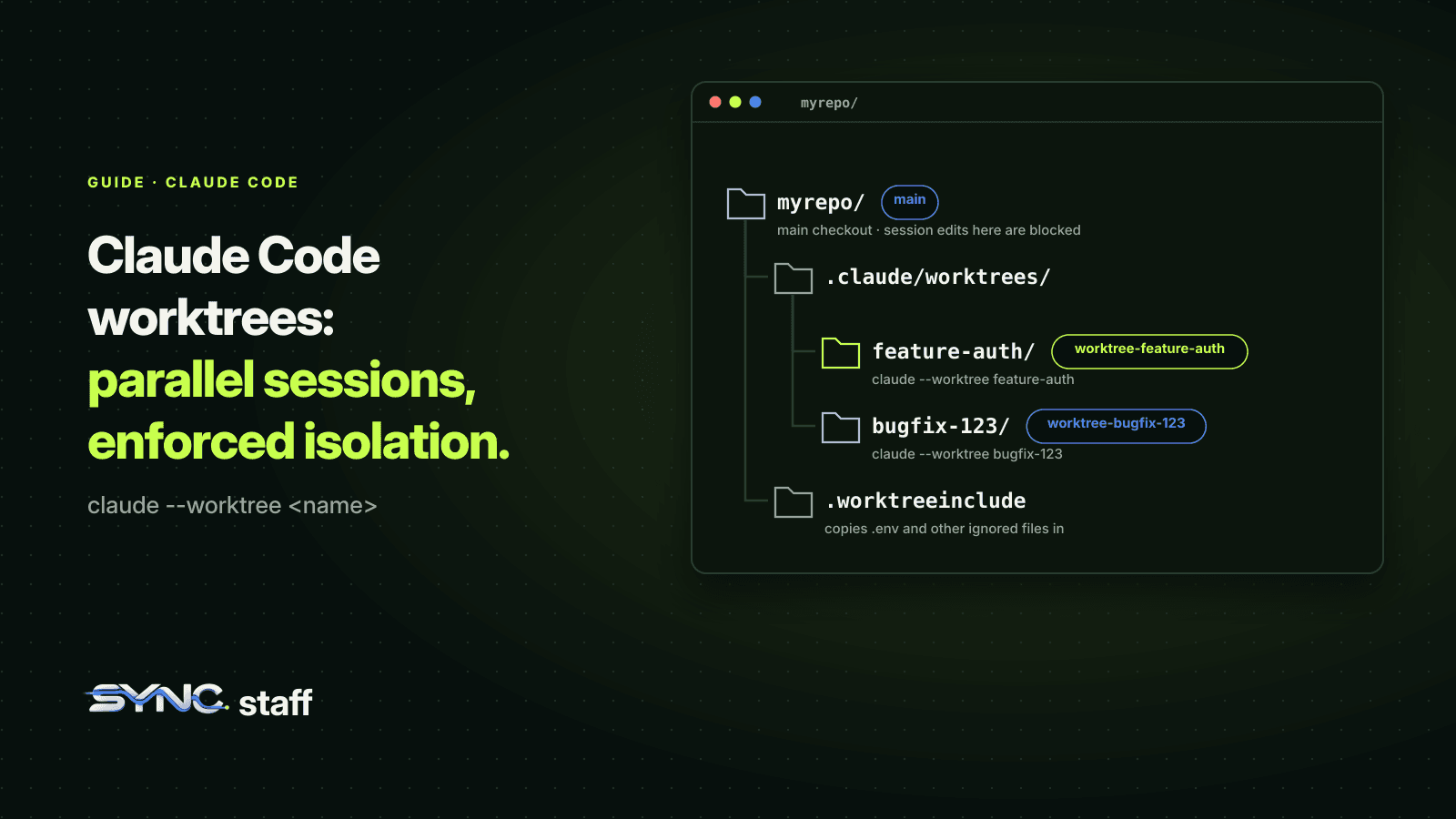
Claude Code worktrees let you run several Claude Code sessions in parallel on one repository, each with its own copy of the files and its own branch, so their edits can't collide while they work. One flag sets it up. What most guides skip is how strictly Claude Code enforces the isolation, what still leaks through it, and what happens when two isolated sessions change the same thing. This guide covers all three, along with the setup, cleanup and team habits that keep worktrees useful.
What is a worktree in Claude Code?
A worktree is a separate working directory with its own files and branch that shares the same repository history as your main checkout. Claude Code can create one per session with the --worktree flag, under .claude/worktrees/<name>/, on a new branch named worktree-<name>. Each session edits its own copy, so one can build a feature while another fixes a bug.
It's plain git worktree underneath, which Git describes as letting one repository "check out more than one branch at a time". Claude Code adds the naming, the cleanup, and enforcement that keeps an isolated session out of your main checkout.
How to run parallel Claude Code sessions with worktrees
Start a session in a new worktree:
claude --worktree feature-auth
Open another terminal and start a second one with a different name:
claude --worktree bugfix-session-timeout
Each gets its own directory and branch. Omit the name and Claude Code generates one, like bright-running-fox. You can also ask Claude to "work in a worktree" mid-session, and it creates one with its EnterWorktree tool.
Three setup details save time:
- Trust the folder first. An interactive
--worktreerun needs workspace trust, so runclaudeonce in the repository to accept the trust dialog. - Ignore the worktrees directory. Add
.claude/worktrees/to.gitignoreso the worktrees don't show up as untracked files in your main checkout. - Copy your ignored config. A worktree is a fresh checkout, so
.envand other ignored files aren't there. List them in a.worktreeincludefile at the repository root and Claude Code copies them into every new worktree:
.env
.env.local
config/secrets.json
What's the difference between a worktree and a branch in Claude Code?
A branch is a line of commits; a worktree is a directory where a branch is checked out. With branches alone, two sessions share one directory, so they share the same files on disk even if they're "on" different branches, and switching branches under a running agent pulls its files out from under it. With worktrees, each session has its own directory and its own branch, so both can work at the same time. We compare them in more depth in git worktree vs branch.
How strictly Claude Code enforces isolation
This is where Claude Code goes further than plain git worktree. While a session is isolated in a worktree, Claude Code applies four checks to its tool calls:
- File edits: an Edit, Write or NotebookEdit that targets a path in the main checkout is blocked.
- Command working directory: a shell command whose working directory is the main checkout, or can't be verified to stay outside it, is blocked.
- Git redirects: a command that points git at the main checkout, through
git -C,--git-dir,GIT_DIR,GIT_WORK_TREEor acd, is blocked. - Command shape: a command whose git usage can't be verified from its text, for example a command name computed at runtime, is blocked, and Claude is told how to rewrite it.
The same checks apply to every subagent spawned from an isolated session. Know the gap the docs name plainly: the checks read paths and command text, not which files a command writes. A cp or a shell redirect into the main checkout isn't refused by them. Your permission rules and sandbox settings still apply to it.
Clean up and resume
When you exit an interactive worktree session, Claude Code checks for work that removing the worktree would destroy:
- Clean worktree: removed automatically, along with its branch, for an unnamed session. If you named the session, it asks first.
- Worktree with changes or new commits: it asks whether to keep or remove it. Keep it and it prints a
claude --worktree <name> --resumecommand to return later. - State it can't verify: it asks rather than deleting.
Non-interactive -p runs don't clean up their worktrees, so remove those yourself with git worktree remove, running git worktree unlock first if git says the worktree is locked.
Choose where worktrees branch from
By default, worktree.baseRef is "fresh": new worktrees branch from your repository's default branch on the remote, usually main, so every session starts from a clean, current tree. Set it to "head" to branch from your current local HEAD instead, carrying unpushed commits and your feature branch's state:
{
  "worktree": {
    "baseRef": "head"
  }
}
You can also start a worktree from a pull request: claude --worktree "#1234" fetches that PR's head commit and creates .claude/worktrees/pr-1234. Quote the argument so your shell doesn't treat # as a comment.
Worktrees for subagents
Subagents can each get their own worktree too. Add isolation: worktree to a subagent's definition and every run gets a temporary worktree, removed automatically if the subagent makes no changes. We tested two subagents told to change the same line: with isolation, each got its own worktree and branch and both edits succeeded, without touching the main checkout. The details are in Claude Code subagents vs agent teams.
What worktrees share with your main checkout
A worktree is isolated, not separate. It shares:
- The repository's
.gitdirectory, so commits made in a worktree land in the same repository. - Plugins installed at project scope.
- Permission approvals: "Yes, and don't ask again" in a worktree session saves the rule to the main checkout's
.claude/settings.local.json, so it applies in every worktree. - Untracked skills, agents and commands, when the worktree has no
.claude/skillsof its own.
Isolation defers the collision; it doesn't remove it
Worktrees stop two sessions overwriting each other's files while they work. They can't stop two sessions making incompatible changes. When two worktrees change the same lines, you find out when you merge. We ran exactly that test with Codex worktrees: two agents, the same line, two successful edits, and a merge conflict at the end.
With two sessions that's a ten-second fix. With a team it isn't. My co-founder Nick and I run between 2 and 15 agents at a time on one repository, across Claude Code, Codex and Gemini, and our costly collisions came from overlap nobody planned: two features that both touched the same schema or router.
Troubleshooting Claude Code worktrees
--worktreeexits asking you to trust the folder. Runclaudeonce in the repository and accept the trust dialog. Non-interactive-pruns skip the check.- Large files show up as small text pointers. If you set up Git LFS with
git lfs install --local, Claude Code skips the repository's own filter drivers when creating a worktree, for safety. Rungit lfs pullinside the worktree. - Creation fails on a symlinked path. Claude Code refuses to create a worktree when
.claude,.claude/worktreesor the worktree directory is a symlink. Remove the symlink and retry. - Git won't remove a worktree because it's locked. Run
git worktree unlockon it, thengit worktree remove, adding--forceif it has uncommitted changes you're sure you don't need. - "Refusing to use … as an isolation worktree." Most often you launched Claude Code from inside the worktree; launch from the main checkout instead. The refused directory stays on disk, so nothing is lost.
- Your repository isn't git. For SVN, Perforce or Mercurial, a
WorktreeCreatehook can replace the git logic and create the working copy your way.
When something looks wrong, git worktree list is the fastest check: it shows every worktree, its branch, and whether it's locked or prunable.
Habits for teams using worktrees
- Name worktrees after the task, so
git worktree listreads like a task board. - Split work by files before you start. Two worktrees that need the same file should run one after the other.
- Merge often and in order, riskiest first, running tests after each merge.
- Keep
.worktreeincludeand.gitignorecurrent so every new worktree builds. - Coordinate across people. Your worktrees are invisible to your teammate's sessions, and theirs to yours.
That last point is the one worktrees can't solve. SyncStaff coordinates across sessions and people: every agent, in any worktree, any tool or any teammate's machine, declares what it's about to change and leases the files first, so overlapping work is caught before it starts instead of at merge time.
Sources: Claude Code worktrees documentation, git-worktree documentation.
Frequently asked questions
What does worktree mean in Claude Code?
A worktree is a separate working directory with its own files and branch that shares your repository's history. claude --worktree <name> creates one under .claude/worktrees/<name>/ on a branch named worktree-<name>, so the session edits its own copy and can run alongside other sessions without overwriting their files.
Can I run multiple Claude Code sessions in parallel with worktrees?
Yes. Start each session with a different name, such as claude --worktree feature-auth in one terminal and claude --worktree bugfix-timeout in another. Each gets its own directory and branch. Add .claude/worktrees/ to .gitignore, and list ignored files like .env in .worktreeinclude so each worktree can build.
Does Claude Code stop a worktree session editing the main checkout?
Yes. While a session is isolated in a worktree, Claude Code blocks edits to paths in the main checkout, shell commands that run there, and git commands redirected into it. It doesn't track every file a shell command writes, so a cp or redirect into the main checkout isn't caught by those checks.
What happens to a Claude Code worktree when I exit?
A clean worktree is removed with its branch automatically, or after asking if you named the session. If it has changes or new commits, Claude Code asks whether to keep it and prints a claude --worktree <name> --resume command for later. Non-interactive -p runs leave their worktrees for you to remove.