Claude Code Sandbox: What It Protects and What It Doesn't
How the Claude Code sandbox works: what it restricts, how to enable it, what runs outside it, its documented limits, and how it fits with permissions.
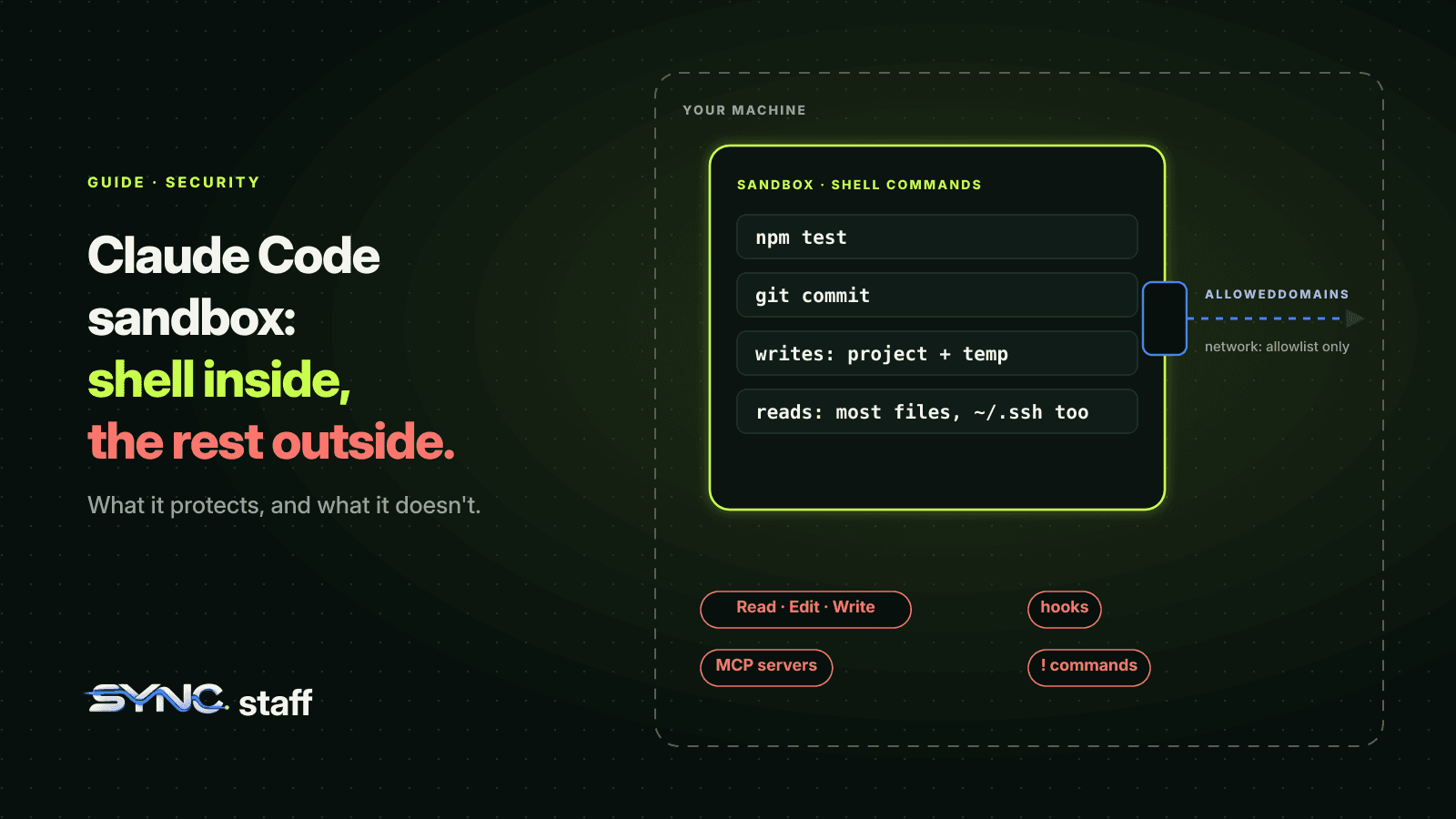
The Claude Code sandbox puts an operating-system boundary around the shell commands Claude runs, limiting which files they can write and which hosts they can reach. Turn it on and Claude can run most commands without asking you each time, because the operating system, not a prompt, enforces the limits. It's one of the most useful safety features in Claude Code and one of the most misunderstood, because it covers less than people assume. This guide covers what it restricts, how to enable it, what runs outside it, its documented limits, and how it fits alongside permissions and worktrees.
What is the Claude Code sandbox?
The sandbox is a boundary that your operating system enforces around Claude's shell commands and every process they start. You choose which directories those commands can write to and which network domains they can reach. Because the limits are enforced while a command runs, Claude Code can safely auto-approve commands that stay inside them, which cuts permission prompts without giving up control.
It runs on macOS, Linux and WSL2. macOS uses Seatbelt; Linux and WSL2 use bubblewrap. On native Windows, Claude Code runs commands unsandboxed, so Windows users need WSL2 to get it.
What the sandbox restricts
The sandbox is off by default. With it on, a sandboxed command can reach:
| Access | Default | Change it with |
|---|---|---|
| Writes | The working directory, a per-user temp directory, and directories you've added. Protected paths stay write-denied | filesystem.allowWrite, filesystem.denyWrite |
| Reads | Most of the machine, including credential files such as ~/.ssh and ~/.aws/credentials |
filesystem.denyRead, credential protection settings |
| Network | No direct route out. Traffic goes through a local proxy that checks each host against your allowed domains, which start empty | network.allowedDomains |
The reads row surprises people. By default the sandbox stops a command from writing outside your project, not from reading your SSH keys. If that matters to you, and it should, add denyRead entries or use the credential protection settings.
How to enable it
Run /sandbox in a session, or set sandbox.enabled to true in a settings file such as ~/.claude/settings.json. There are two modes:
- Auto-allow mode: a command that runs inside the sandbox is approved automatically, with no prompt. Commands that run outside it go through the normal permission flow.
- Regular permissions mode: every command still goes through the permission flow, even when sandboxed. More control, more prompts.
Auto-allow doesn't override your rules. A command that matches a Bash deny rule is still blocked. Content-scoped ask rules like Bash(git push *) still prompt. Removals targeting critical paths, like your home directory, still go through the regular flow. We cover how deny and ask rules work in Claude Code permissions for teams.
How the sandbox and permission modes work together
The sandbox and your permission mode are separate controls. Auto-allow works independently of your permission mode, with a few exceptions. In plan mode, auto-allow doesn't widen what's approved; plan mode's own rules decide what runs while you plan. For network access, the sandbox keeps a command inside the boundary when it tries to reach a host you haven't allowed, and your permission mode decides what happens next: whether you're asked about the new host or whether auto mode's classifier decides.
In practice that gives three sensible combinations. Manual mode with the sandbox in auto-allow: you approve file edits and risky actions, and routine shell commands run without prompts. Auto mode with the sandbox: the classifier handles most actions and the operating system still enforces the file and network boundary underneath it. Regular permissions mode: every command prompts, for the most sensitive work.
What runs outside the sandbox
This is the part to understand before you rely on it. The sandbox wraps shell commands only. These run outside it:
- Claude's own file and web tools. Read, Edit, Write, WebFetch and WebSearch follow permission rules instead. A
denyReadentry doesn't stop the Read tool, andallowedDomainsdoesn't limit WebFetch. - Other processes Claude Code starts: hooks, local MCP servers, plugin monitors, language servers and your status line command all run with your full access.
- Commands you type yourself at the
!prompt, in most sessions. - Commands matching
excludedCommands, which you've chosen to run unsandboxed. - Unsandboxed retries: after a command fails in the sandbox, Claude can ask to run it outside. An allow rule that matches the command also approves its unsandboxed retry without a prompt.
So file-level protection needs permission rules as well, and hooks need reviewing as code that runs with your access. We cover hook safety in Claude Code hooks.
The documented limits
Anthropic is direct that sandboxing "reduces risk but is not a complete isolation boundary." The limits it lists:
- Network filtering is by hostname. The proxy doesn't inspect encrypted traffic by default, and allowing broad domains such as
github.comcan open paths for data exfiltration, including domain fronting. - Unix sockets can be a way out. Allowing
/var/run/docker.sock, for example, effectively grants access to the host. - Broad write permissions can escalate. Allowing writes to directories on your
PATHor to shell configuration files like.bashrccan lead to code running outside the sandbox later. - The weaker nested sandbox on Linux, used to run inside Docker without privileged namespaces, "considerably weakens security."
- Apple Events on macOS: allowing them lets sandboxed commands launch other applications unsandboxed.
The practical rule: keep allowed domains narrow, never allow sockets you don't understand, and don't widen write access to anything that runs code.
Sandboxing with subagents, background sessions and worktrees
Subagents run in the same process as your session and use the same sandbox configuration, so their shell commands are sandboxed when yours are. Background sessions run in their own process and are sandboxed when their own settings enable it. In a worktree, git commands write to the repository's shared .git directory, and the sandbox allows those writes, so git commit works from inside a sandboxed worktree session. See Claude Code worktrees.
Sandbox vs permissions vs worktrees
These three get confused because they all "isolate" something. They protect different things:
| Protects against | Doesn't protect against | |
|---|---|---|
| Sandbox | A shell command reaching files or hosts outside the boundary | Claude's file tools, hooks, MCP servers; reads of credentials by default |
| Permissions | Specific tools and commands running without approval | Anything an allow rule or auto mode approves |
| Worktrees | One session's edits landing in another session's files | Two sessions making conflicting changes that meet at merge |
A careful setup uses all three: the sandbox for shell commands, permission rules for file tools and risky actions, and a worktree per parallel session.
Enforcing the sandbox for a team
Organisations can enforce sandboxing through managed settings, so developers can't turn it off or widen the policy. If you do, keep the allowed domain list short and owned by someone, and publish the reasons for each entry. A sandbox nobody understands gets an excludedCommands list that slowly grows until it covers everything.
A starter sandbox setup
A reasonable first configuration turns the sandbox on, blocks reads of your most sensitive credential folders, and allows only the hosts your project actually needs:
{
  "sandbox": {
    "enabled": true,
    "filesystem": {
      "denyRead": ["~/.ssh", "~/.aws"]
    },
    "network": {
      "allowedDomains": ["registry.npmjs.org"]
    }
  }
}
Check the settings reference for the exact path syntax your version accepts, then add domains one at a time as commands fail with a host-not-allowed error. Each addition should be a host you can name a reason for. Resist broad entries like github.com unless you need them, because a broad domain is also a broad exit.
Confirm commands are really running sandboxed before you rely on it, and expect a few tools to need attention. Anthropic's troubleshooting section covers the usual suspects, including test runners that hang, Docker, git over SSH, and servers on localhost. When a tool genuinely can't run sandboxed, prefer a narrow excludedCommands entry for that one command over turning the sandbox off.
The sandbox protects your machine, not your teammates' work
Turn the sandbox on: it cuts prompts and keeps shell commands inside the project and away from hosts you didn't approve. Pair it with permission rules for the file tools it doesn't cover. Then remember what none of it sees. My co-founder Nick and I run between 2 and 15 agents at a time across Claude Code, Codex and Gemini, and every one of them could be perfectly sandboxed while two of them rewrite the same file. A sandbox keeps one agent inside its boundary; it can't tell it that another agent is already changing that file. SyncStaff covers that gap: every agent, from any tool, declares its change and leases the files before editing, and the decisions that matter reach a person.
Sources: Configure the sandboxed Bash tool, Claude Code worktrees documentation.
Frequently asked questions
What is the Claude Code sandbox?
It's an operating-system boundary around the shell commands Claude runs and the processes they start, limiting which directories they can write to and which network hosts they can reach. Because the limits are enforced while commands run, Claude Code can auto-approve sandboxed commands and ask you less often.
How do I enable sandboxing in Claude Code?
Run /sandbox in a session, or set sandbox.enabled to true in a settings file such as ~/.claude/settings.json. Choose auto-allow mode to approve sandboxed commands without prompts, or regular permissions mode to keep prompting. It runs on macOS, Linux and WSL2; native Windows runs commands unsandboxed.
Does the Claude Code sandbox protect my SSH keys?
Not by default. A sandboxed command can read most of the machine, including credential files such as ~/.ssh and ~/.aws/credentials. Add filesystem.denyRead entries or use the credential protection settings to block those reads. The sandbox also doesn't cover Claude's Read tool, which follows permission rules instead.
What does the Claude Code sandbox not cover?
It wraps shell commands only. Claude's file and web tools, hooks, MCP servers, language servers and your status line run outside it, as do commands you type at the ! prompt, commands in excludedCommands, and approved unsandboxed retries. Anthropic notes it reduces risk but is not a complete isolation boundary.