Claude Code Compact: Preserve Decisions After /compact
Learn what Claude Code compact keeps, what it summarizes, and how to preserve owners, constraints, review gates, and next actions across long sessions.
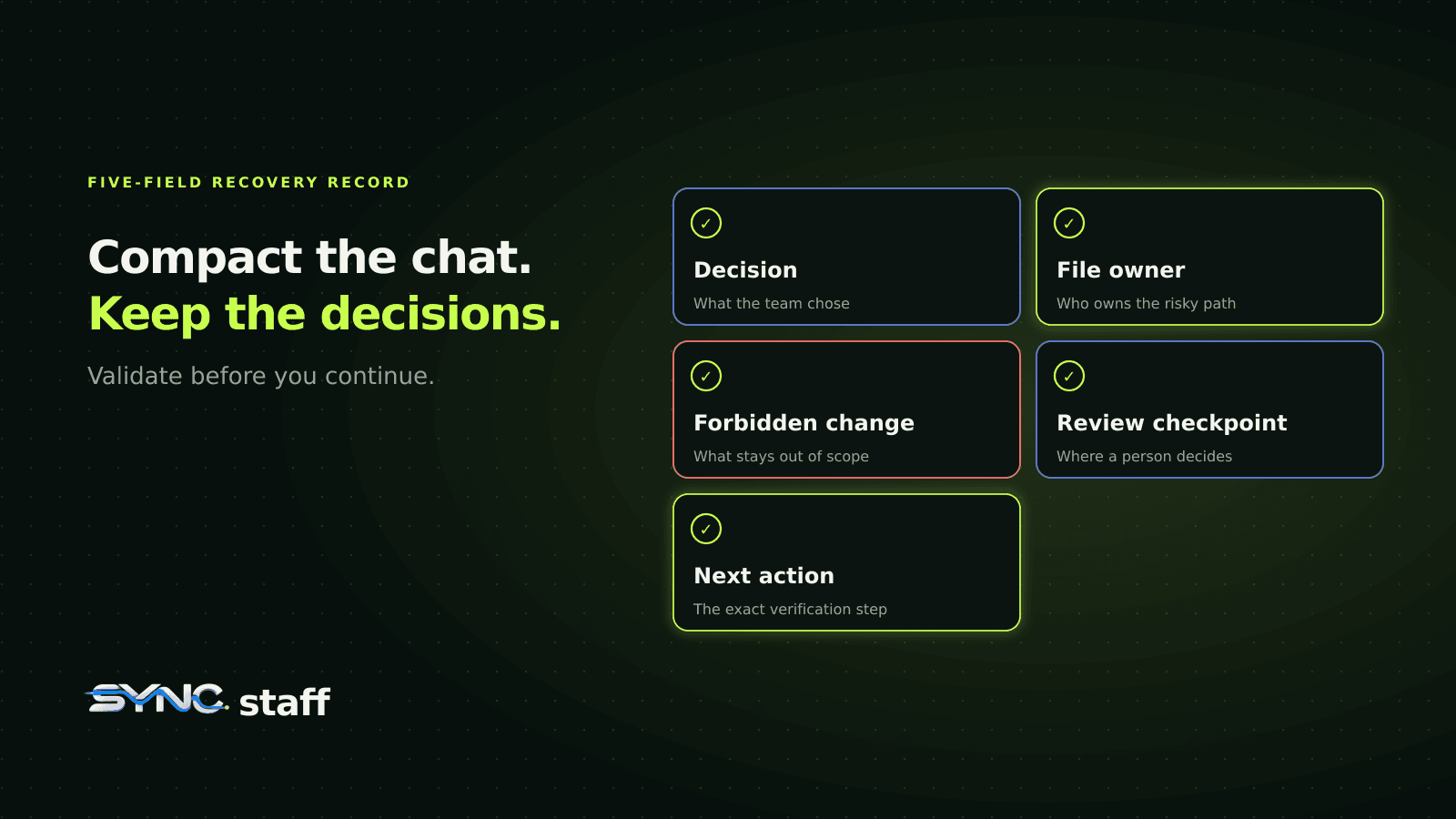
Claude Code compact reduces a long session by replacing older conversation history with a structured summary. That keeps the session moving, but a summary is not a reliable place for the decisions a team must preserve. Before you run /compact, write down the file owner, settled decision, forbidden change, review checkpoint, and next action. After compaction, verify those five fields before the agent continues.
This guide separates documented Claude Code behavior from a small fixture we ran. The documentation tells us which sources reload. Our fixture only proves that a structured five-field record can detect missing handoff data and be re-read. It does not measure Claude Code or claim that normal summaries always drop three fields.
What does Claude Code compact do?
/compact summarizes the current conversation so Claude Code can continue inside the model's context window. Automatic compaction performs the same kind of transition when the configured window fills. The compacted session is not blank: Claude Code reloads several disk-backed sources and carries a generated conversation summary forward.
The official context-window documentation makes the useful distinction explicit:
| Context source | What happens after compaction |
|---|---|
Project-root CLAUDE.md and unscoped rules |
Re-injected from disk |
| Auto memory | Re-injected from disk |
| Current plan | Re-injected from disk |
| Recently read or edited files | Up to five are re-read, subject to size limits |
Path-scoped rules and nested CLAUDE.md files |
Reload on demand when their path triggers again |
| Earlier hook output | Summarized with the conversation |
| Conversation-only decisions | Depend on the generated summary |
That means “Claude knows it” is too vague. A rule in the project root and a decision mentioned 30 turns ago enter the context through different paths. One has a documented reload path. The other relies on summary quality.
Our Claude Code memory audit covers information saved between sessions. Compaction is a narrower problem: the session is still alive, but its working record has changed.
Is compact the same as clear?
No. Compact preserves a summary so you can continue the same task. Clear starts fresh when the old task should no longer shape the next one.
Use /compact before another phase of the same refactor. Use /clear when you have finished the refactor and are moving to an unrelated bug. If the next task needs a formal handoff, start a new session with a written record instead of dragging an increasingly mixed summary forward.
The documented focused form is useful:
/compact focus on the authentication cache refactor, its rejected alternatives, and the review gate
Focused instructions help the summarizer prioritize the right material. They still do not replace an external record for a decision another person or agent must verify.
What survives and what can become incomplete?
The safest assumption is that durable sources reload and conversational detail is compressed. Claude Code documents important exceptions, including recent-file re-reads and invoked skills, but none turns the transcript into a database.
A team should save facts that control future work, especially:
- Decision: what the team chose, not just the broad goal.
- File owner: who currently owns the risky file or subsystem.
- Forbidden change: an option already rejected or an action outside scope.
- Review checkpoint: what needs a person before merge or deployment.
- Next action: the exact verification or handoff step to run next.
These fields are different from general project instructions. “All authentication changes need security review” may belong in a shared instruction file. “Agent auth owns src/auth/cache.ts until this review finishes” is temporary task state. Putting every temporary fact in CLAUDE.md makes the file noisy and can leave stale ownership rules behind. See CLAUDE.md best practices for that boundary.
The plan is also not a substitute for the record. A plan says what work remains. It may not say which alternative was rejected, why a file is reserved, or which human checkpoint blocks the merge. Claude Code plan mode is useful for sequencing; the handoff record carries decisions that constrain that sequence.
A five-field record for long sessions
Keep the record small enough to read at every transition. Here is the fixture used for this article:
{
  "decision": "Keep the existing cache key format for this release.",
  "file_owner": "agent-auth owns src/auth/cache.ts until review.",
  "forbidden_change": "Do not add a second caching layer.",
  "review_checkpoint": "A human reviews auth and migration changes before merge.",
  "next_action": "Run the focused auth tests, then request review."
}
Save it somewhere the team already treats as temporary task state, for example .claude/handoff.json on a task branch. Do not put secrets, tokens, customer data, or unrestricted approvals in it. Decide whether the file is committed, ignored, or stored in a coordination system based on who needs to read it.
The names matter less than the completeness check. A Markdown note works too, provided your validator can tell whether all five ideas are present. JSON makes the example deterministic and keeps the hook simple.
What did the fixture prove?
We compared two synthetic records:
- an intentionally incomplete prose-like summary containing a broad decision and next action;
- the five-field structured record above.
The validator found 2 of 5 required fields in the incomplete fixture and 5 of 5 after the structured record was reloaded. That is a three-field improvement in this constructed example.
This result does not mean Claude Code normally retains 40 percent of decisions. We did not run a model, fill a live context window, or sample multiple compactions. The result proves a smaller, operational claim: a schema can flag an incomplete handoff, while a complete record gives the post-compaction session explicit facts to re-read.
That bounded claim is more useful than pretending a single dramatic session measures a product-wide failure rate.
Validate the record before compaction
The following standard-library script checks the five fields and prints the record only when it is complete. Save it as .claude/hooks/check-handoff.py.
import json
import os
import sys
from pathlib import Path

required = (
    "decision",
    "file_owner",
    "forbidden_change",
    "review_checkpoint",
    "next_action",
)
strict = "--strict" in sys.argv
project_dir = Path(os.environ.get("CLAUDE_PROJECT_DIR", "."))
path = project_dir / ".claude/handoff.json"

try:
    record = json.loads(path.read_text())
except (OSError, json.JSONDecodeError) as exc:
    print(f"handoff record unavailable: {exc}", file=sys.stderr)
    raise SystemExit(2 if strict else 0)

missing = [key for key in required if not record.get(key)]
if missing:
    print("handoff record missing: " + ", ".join(missing), file=sys.stderr)
    raise SystemExit(2 if strict else 0)

print("Current task decisions:")
print(json.dumps(record, indent=2))
Run it directly before relying on any hook:
python3 .claude/hooks/check-handoff.py --strict
A complete record exits zero and prints the JSON. In strict mode, a missing file, invalid JSON, or blank required field exits two. Without --strict, the script prints the warning but exits zero so a post-compaction reload does not turn missing optional task state into a failed session-start hook.
That behavior is useful with PreCompact, but understand the tradeoff. The hooks reference says a PreCompact hook can block manual or automatic compaction. If it blocks an emergency compaction after the API has already hit the context limit, the underlying request can fail. Keep the validator fast, and do not make an unreliable network service a hard dependency.
A safer rollout is:
- Run the script manually for a week.
- Add it as a warning or manual
PreCompactcheck. - Block automatic compaction only if your team accepts the failure mode.
- Keep the record small enough that loading it does not create a new context problem.
Reload decisions after compaction
A SessionStart hook with the compact matcher runs after both manual and automatic compaction. Its standard output is added to the compacted context. That makes it a documented place to re-read the same validated record.
Add this to the shared .claude/settings.json:
{
  "hooks": {
    "SessionStart": [
      {
        "matcher": "compact",
        "hooks": [
          {
            "type": "command",
            "command": "python3 \"$CLAUDE_PROJECT_DIR\"/.claude/hooks/check-handoff.py"
          }
        ]
      }
    ]
  }
}
The committed file gives every Claude Code session in the repository the same reload behavior. Our Claude Code settings for teams explains when shared settings are appropriate and how precedence works.
Test the command outside Claude Code first. Then create a disposable session, write a non-sensitive handoff record, run /compact, and ask the session to restate the five fields. Inspect the answer against the file. Do not infer success from the hook exit code alone.
For more complex lifecycle behavior, use the Claude Code hooks guide. PreCompact can influence or block the transition, PostCompact receives the generated summary for logging, and SessionStart: compact can add current disk state to the new context. They solve different problems.
What should not go in the hook?
Do not print an entire issue tracker, a large transcript, secrets, or every decision the repository has ever made. Hook output consumes context. Load only the active task record, keep it reviewable, and remove or archive it when ownership changes.
A hook is also not an authorization system. A line saying “approved” is evidence to review, not permission for a future destructive action. Keep real approvals behind the permissions, review, and deployment controls that enforce them.
When should you compact, clear, or start a new session?
Choose based on task continuity, not on how long the terminal has been open.
| Situation | Best action | Record first |
|---|---|---|
| Same task, next phase | Focused /compact |
Decisions, owner, constraints, review gate, next action |
| Unrelated task | /clear |
Final outcome and any handoff needed elsewhere |
| Different worker or agent | New session with explicit handoff | Reproduction steps, evidence, ownership, review requirements |
| Context almost full and state is incomplete | Save and validate the record first | All five required fields |
| Current summary appears wrong | Stop work and compare with disk and Git | Corrected decision record and observed mismatch |
A Git diff is part of the evidence, but it cannot explain why a change was rejected or who must review it. A task board shows ownership, but it may not contain the exact command to run next. Use the smallest combination that lets the next step be independently checked.
A practical compaction checklist
Before compaction:
- Finish or stop at a logical boundary.
- Update the five-field handoff record.
- Run the validator.
- Check
git statusand save any evidence the next phase needs. - Run a focused
/compactinstruction.
Immediately after compaction:
- Ask for the decision, owner, forbidden change, review checkpoint, and next action.
- Compare the answer with the record on disk.
- Re-read the relevant files before editing.
- Stop if ownership or the review gate is missing.
- Continue only when the compacted session and durable record agree.
When several agents share a repository, this is also a coordination problem. SyncStaff can keep ownership, handoffs, and human decisions in a shared work record across tools. It does not prevent Claude Code compaction or reconstruct a lost transcript. The useful boundary is simple: let Claude Code manage its context, and keep team-critical state somewhere the next worker can verify independently.
Frequently asked questions
What does /compact do in Claude Code?
The /compact command replaces older conversation history with a structured summary so the session can continue with less context. Claude Code then reloads several disk-backed sources, including project instructions and auto memory. Conversation details that are only in chat depend on the generated summary, so record critical decisions outside the transcript.
What survives Claude Code compaction?
Project-root CLAUDE.md, unscoped rules, auto memory, a fresh Git status snapshot, and the current plan can be re-injected from disk. Claude Code also re-reads a limited set of recent files. Path-scoped rules, nested instructions, earlier hook output, and conversational details may be summarized or reloaded only when triggered again.
Is /compact the same as /clear?
No. Use /compact when you want to continue the same task with a summarized conversation. Use /clear when you are switching to unrelated work and want the old conversation removed from the working context. Before either action, save owners, constraints, review gates, and the next action in a durable project record.
Can a hook restore context after compaction?
A SessionStart hook with the compact matcher runs after manual or automatic compaction, and its output is added to the new context. It can re-read a small decision record from disk. The hook cannot reconstruct reasoning that was never saved, so validate the record before compaction instead of treating the hook as a backup system.
Does the fixture prove what Claude Code will remember?
No. The fixture is deliberately synthetic. It proves that a five-field handoff schema detects an incomplete summary and that a complete structured record can be reloaded. It does not invoke Claude Code, evaluate a model, or measure normal compaction quality. Use it as a workflow check, then inspect your actual compacted session.