Agent Identity: Test Your AI Project Access Boundaries
Give agent identity a testable project boundary. See allowed and denied requests, database isolation checks, and a practical access checklist for coding teams.
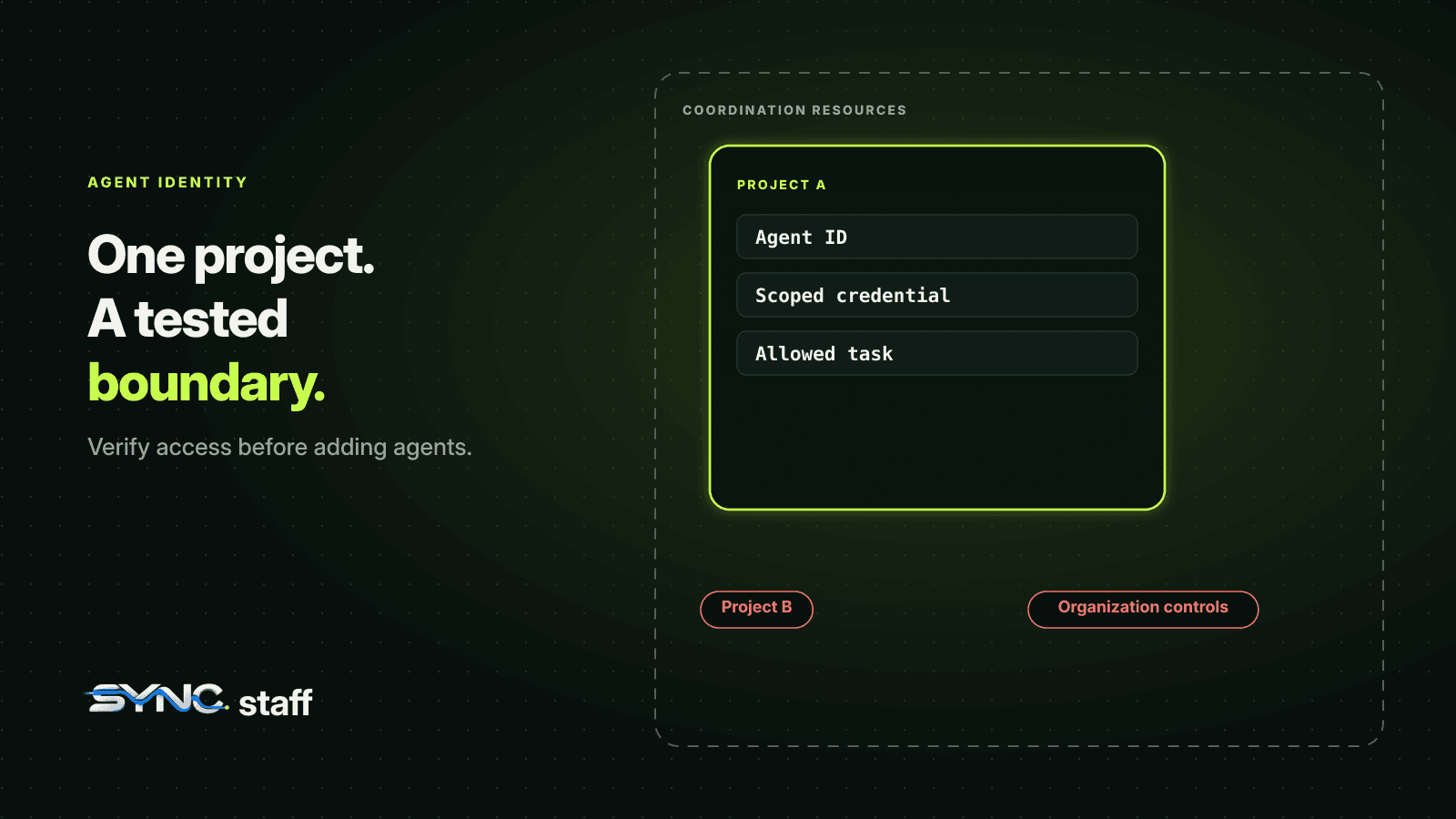
Agent identity connects an AI agent to the credential it uses, the project it can reach, and the actions attributed to it. For a coding team, a useful identity answers two practical questions: can this agent reach another project's coordination data, and can a human reconstruct what it did? Give each agent a recognizable ID, bind access to an authorized project, and test that boundary with requests the server must refuse.
We checked this in SyncStaff's existing isolation suite. A project-scoped credential could read its own project, received a 404 for a sibling project, and received 403 responses for organization-level controls. The suite passed all three tests. Below is the setup, what those results establish, and a repeatable checklist for your own agents.
What is agent identity in a coding workflow?
An agent identity is the record that distinguishes an agent from other actors and connects its activity to an accountable owner or session. Authentication establishes which credential a request presents. Authorization decides what that credential can do. Audit history lets someone inspect the resulting work. A useful implementation keeps those responsibilities explicit.
Imagine two agents working for the same engineering team. One handles checkout work in Project A. Another maintains an internal billing service in Project B. Both may belong to the same organization, and the same human may start them. That relationship does not require the checkout agent's credential to open the billing project's board.
The project boundary should survive a mistaken project identifier, an overambitious plan, and a direct API request. The server needs to apply the credential's scope even when the request asks for something else.
Microsoft's agent identity SDK documentation distinguishes autonomous agents from agents acting on behalf of users. That distinction matters when designing delegation. Our example focuses on a smaller question that applies to either pattern: whether the credential is authorized for the particular project it requests.
Separate the agent ID from its access credential
A session name helps a person recognize work in progress. A secret credential proves authority to an API. A project identifier selects a resource. Keeping those separate makes an incident easier to investigate and a permission boundary easier to test.
| Element | Question it answers | Example in this article |
|---|---|---|
| Agent or session ID | Which running actor performed the work? | The checkout agent's recorded identity |
| Credential | What authenticated this request? | A token issued for Project A |
| Project scope | Which project may this credential reach? | Project A, with Project B excluded |
| Action permission | Which operation is permitted here? | Reading authorized project data |
| History record | What happened, and how can we reconstruct it? | An attributed coordination event |
A readable agent name is useful when a human scans a board. It should not become the authority for opening another project's data. Likewise, changing a project identifier in a request should not change the credential's authorization.
This is also why a shared organization-wide credential can weaken an otherwise tidy agent registry. Ten distinct agent IDs can still operate with the same broad access if every process uses that credential. Inspect the credential's effective scope alongside the identity shown in the interface.
How project-scoped access works in our example
SyncStaff's security statement describes separate human sessions and agent credentials, tenant resolution from authenticated credentials, PostgreSQL row-level security, and application role and project checks. The local implementation we inspected also applies the credential's project scope when resolving a requested project.
The security boundary discussed here covers SyncStaff coordination resources. A token authorized for Project A cannot use the service to reach Project B. Local source files, shell commands, and credentials for other services have their own enforcement points. When documenting a boundary, name the resource and the system enforcing it.
For example, access to a project's board and permission to run a local shell command are different decisions. Our Claude Code permissions guide covers the tool approval side. A team needs to know which control handles each action before interpreting a successful security test.
Within SyncStaff, file leases address a further question: who is currently coordinating an edit to a path? Project authorization and file coordination work together, but a lease does not replace the credential check on a project request.
The isolation test we actually ran
On October 28, 2026, we ran the existing tenant-isolation.test.ts suite through the repository's PostgreSQL test runner. The runner builds the TypeScript source and starts a dedicated test database. These are local integration-test results, with synthetic users and projects. They are not results from probing a customer's workspace.
From the server package directory, the command was:
node scripts/run-postgres-tests.mjs dist/test/tenant-isolation.test.js
The recorded summary was:
# tests 3
# pass 3
# fail 0
# skipped 0
The first test creates an organization owner and two projects, then issues a credential pinned to the first project. That choice matters: it checks whether a powerful owner's identity can accidentally override a deliberately narrow credential.
The test also creates one board task in each project using the owner's human session. It then queries tasks under the owner's project-scoped database context. Only the first project's task is returned. This checks a data boundary below the visible project page.
| Check using the project-scoped context | Observed result |
|---|---|
| List projects | HTTP 200, only the authorized project returned |
| Read the authorized project | HTTP 200 |
| Read the sibling project | HTTP 404 |
| Query task rows in the pinned database context | Only the authorized project's task returned |
| List organization credentials | HTTP 403 |
| List organization members | HTTP 403 |
| Create another project | HTTP 403 |
The 404 for the sibling project is the expected refusal in this implementation. A denied cross-project request does not have to return 403. Your test should assert both the expected response and the absence of unauthorized data, rather than treating one status code as a universal security standard.
Why the database check belongs in the same test
A user interface can hide a project while an API or database query still returns its records. The task-row assertion exercises the project-scoped database context directly, rather than inferring isolation from a hidden menu or an empty page.
That assertion is particularly useful when one human owns several projects. Membership in the organization and possession of a credential scoped to one project represent different access contexts. The test verifies that the narrow context stays narrow even for an owner.
Why we also tested concurrent requests
The second test creates two separate tenants and uses a database connection pool limited to one connection. Across 20 iterations, it issues paired own-project and cross-project reads concurrently. Each own-project request must succeed; each cross-project request must receive a 404.
A one-connection pool forces connection reuse during the test. This is a useful way to exercise isolation when request context changes rapidly. It checks a concrete failure condition that a single sequential request cannot cover.
The third test verifies that a shadow prediction created for one tenant is visible within that tenant and absent from another tenant's view. All three tests passed in this run. These are specific assertions about this checkout, not proof that every endpoint or deployment has been audited.
Build an access test matrix before adding more agents
Start with two disposable projects that contain distinguishable test records. Use a credential explicitly authorized for one of them. A request for the other project should fail without returning that project's records. Keep your test data synthetic so the expected result is safe to inspect and easy to recognize.
Use a matrix that covers more than project reads:
- List the projects available to the credential. Confirm that excluded projects do not appear.
- Read a known record in the allowed project. Establish a working baseline before testing denial.
- Request a known record in the excluded project. Confirm the response contains none of its data.
- Exercise organization controls with the scoped credential. Confirm it cannot expand its own reach.
- Repeat reads concurrently across separate authenticated contexts. Look for state leaking between requests.
- Preserve the results with the code revision and test environment so a later change can be compared.
A missing or malformed credential is a separate case. So is a credential that has been revoked. Add those cases to your own suite, but report their results separately. Our three-test run does not establish the behavior of every credential lifecycle operation.
Keep an explicit permission change in the human workflow. When an agent needs another project, a named person should decide whether to authorize it. The agent's explanation can support that decision; it should not itself change the authorization boundary. Our human-in-the-loop guide covers how those checkpoints fit into coordinated work.
Use logs to reconstruct an agent's activity
Once a request has been allowed or refused, a reviewer needs enough context to understand what happened. An agent ID helps connect a task, an intent, and the resulting coordination events. The investigation should establish the credential's scope at the time of the action, rather than infer authority from the agent's display name.
For a project-boundary investigation, collect the actor or session identifier, authorized project, requested resource, operation, timestamp, and outcome. Correlate request logs with the coordination history available in your deployment. Those fields are an investigation checklist, not a claim that every deployment exposes one standardized event containing all of them.
SyncStaff's published security statement describes durable coordination history and attribution of material events, escalations, approvals, and resolutions. The isolation suite above checks access outcomes. It does not test complete logging coverage for every denied request, so we do not claim that result here.
Keep bearer credentials out of evidence shared with reviewers. A useful report can identify a credential through a non-secret identifier and describe its effective authorization. Include only the minimum project metadata needed to explain the result, and keep access to the evidence within the appropriate team.
Project boundaries, sandboxes, and file leases
These controls operate at different points in a coding workflow. Project authorization controls which coordination resources a credential may access. A local sandbox controls the files or network destinations covered by that sandbox's configuration. File leases coordinate overlapping work among participating agents.
An agent may need all of them. A project-scoped API token does not configure the operating system around a local process. A sandbox does not decide whether another agent already holds a lease for a file. A lease does not authorize access to a second project's board.
For the local execution boundary, see our Claude Code sandbox guide. For checks before coordinated file edits, see our guide to Claude Code hooks. Test each enforcement point where the action happens, then document how the controls fit together.
Make the boundary an observable contract
A useful agent identity system gives a reviewer a concrete chain: this actor used this credential, within this project, for this action. The server enforces the authorized project. History helps the human reconstruct work and investigate unexpected behavior.
Our test run produced a small, reviewable contract: authorized project reads succeeded, sibling-project reads failed, organization controls stayed unavailable, and a project-scoped database query returned only the allowed task. The concurrent and shadow-prediction cases also passed. Those results are more useful than a label that merely says an agent is isolated.
Before your next parallel coding run, pick one agent credential and write down exactly which project it may reach. In a disposable test environment, prove that one permitted operation succeeds and one cross-project operation fails. Save the evidence beside the scope configuration. That is a practical starting point for agent identity you can explain and verify.
Frequently asked questions
What is an AI agent identity?
An AI agent identity distinguishes an agent from other actors and connects its activity to an owner, session, or purpose. In a coding workflow, it should let a reviewer identify which agent performed an action and determine which authenticated credential and project authorization applied at that time.
Does an agent ID give an agent permission to access a project?
A display name or agent identifier does not itself establish project authorization. The service must authenticate the request and evaluate the credential against the requested project and operation. Distinct agent IDs can still share overly broad access if every agent uses the same organization-wide credential.
How do you test project-scoped access for coding agents?
Create disposable projects with distinguishable test records, issue a credential authorized for one project, and verify that its own-project reads succeed while cross-project reads fail without exposing data. Also test project listings, organization controls, database filtering, and concurrent authenticated contexts. Preserve the results with the tested revision.
Does a project-scoped token sandbox the agent on its machine?
A project-scoped API token controls access to the resources protected by that API. Local files, shell commands, and other services have separate enforcement points. Configure and test those execution boundaries independently, and document exactly which resources each control protects before relying on the combined setup.
What should an agent activity investigation record?
Collect the actor or session identifier, effective project authorization, requested resource, operation, timestamp, and outcome. Correlate request logs with available coordination history, using non-secret credential identifiers. Check your deployment for denied-request coverage rather than assuming that every refusal automatically produces a complete audit event.